Designed to work even if we don't.
A legacy plan has to outlive the company that holds it. With an Offline Recovery Bundle, your family can open your vault on their own computer, with no servers, no account and no Eternal Vault.
- Runs fully offline
- Open source, MIT
- Stays encrypted end to end
- Free on every plan

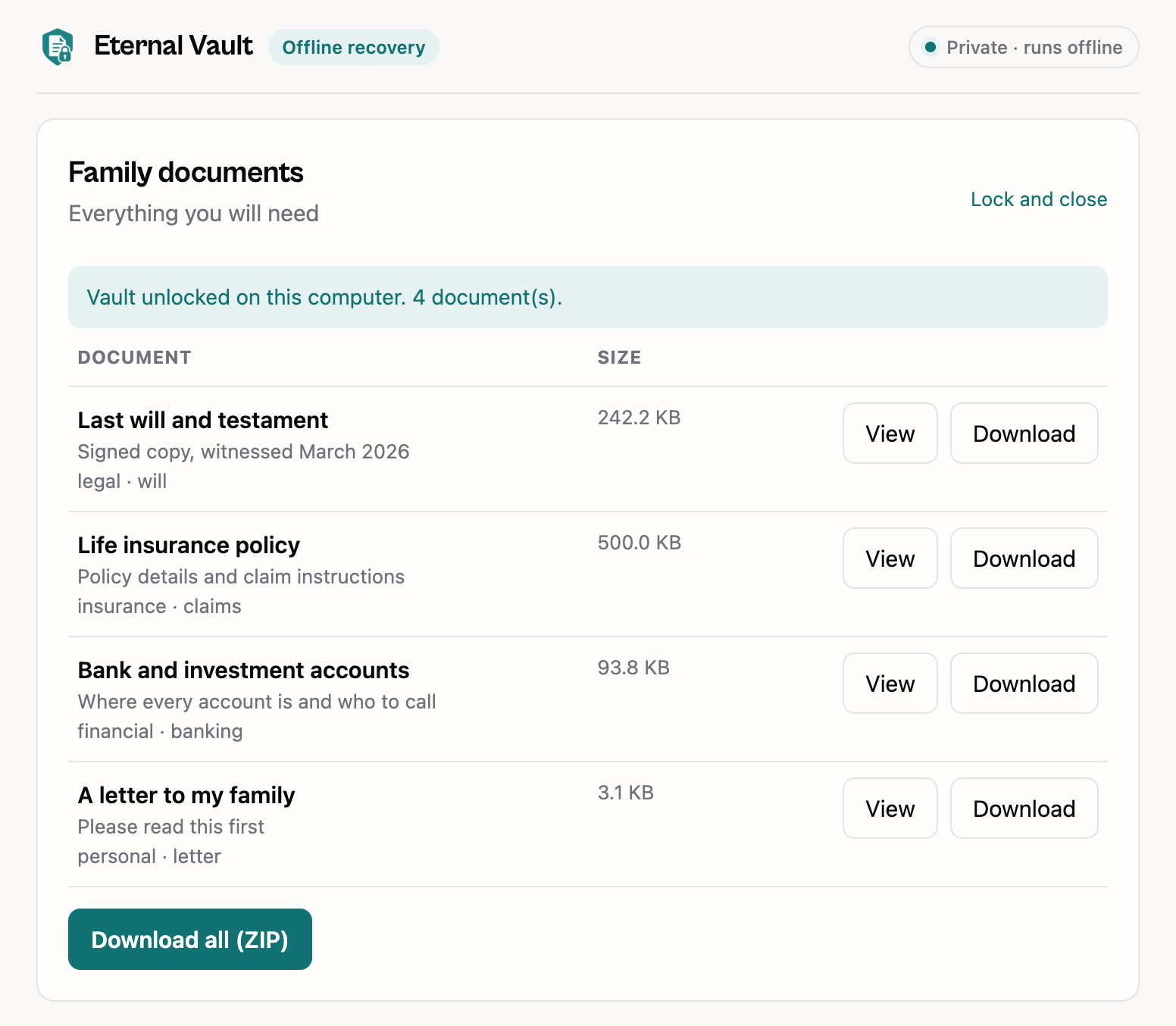
The recovery tool opening a vault. No internet, no Eternal Vault.
If we shut down tomorrow
Here is exactly what would happen, and what wouldn't.
- Day 0
You hear it from us first
Every user and every verified contact gets an email, at least 90 days before anything changes.
- Next 90 days
Everything keeps working
Your vault, contacts and heartbeats run as normal. Download a final recovery bundle at any time.
- Shutdown
Our servers go dark
The website and dashboard stop. Your bundle and the recovery tool do not depend on either.
- Forever after
Your family can still get in
Your bundle opens offline with their access codes. The open-source tool stays public for anyone to host.
Two ways in, one honest tradeoff
Normally your vault opens through Eternal Vault, after your Inactivity Threshold. The Offline Recovery Bundle is the backup that doesn't need us. Offline, nothing can enforce a waiting period, so it's optional.
| Legacy Access | Offline Recovery Bundle | |
|---|---|---|
| Works without Eternal Vault | ||
| Waits for your Inactivity Threshold | ||
| You can stop a false alarm | ||
| Always has your latest documents | When you refresh it | |
| Contacts use their access codes | ||
| Cost | Included | Free on every plan |
How offline recovery works
About a minute for you. A few minutes for your family, whenever they need it.
- 1
Create your bundle
One click in your dashboard. Before you download, you see exactly who could open it.
- 2
Store it and tell your people
Keep it somewhere safe and print each contact a letter saying where it is. Codes are never printed.
- 3
They open it, offline
Your contacts open the recovery tool, choose the bundle and enter their access codes. Nothing is sent anywhere.
Our promises
Written down here so you can hold us to them.
90 days’ notice
Before any planned shutdown, by email, to you and every verified contact.
Open-source recovery tool
MIT licensed and documented byte for byte, so anyone can host or rebuild it.
The tool travels with your data
Every bundle carries its own copy. No website is needed to recover, including ours.
Never behind a paywall
Offline recovery is free on every plan, including the free plan.
One small file your family can keep forever
The recovery tool is a single web page that opens a bundle in any browser. It's already inside every bundle. Keep a spare copy alongside it if you like.
$ shasum -a 256 recover.html
9cf3423b8104e44aaa08a70bfd8a6c3f9a53e22fcd6986403368916b26c5264b  recover.html

# It must match the fingerprint above exactly.
# Windows: Get-FileHash recover.html -Algorithm SHA256
Questions? We have answers.
Can't find what you need? Read the guide for contacts or get in touch.
What happens to my vault if Eternal Vault shuts down?
If you have downloaded an Offline Recovery Bundle, your trusted contacts can still open your vault with their access codes using the free, open-source recovery tool. It runs entirely offline and does not need our servers, our domain, or our company. For a planned shutdown, we will give at least 90 days of notice to every user and every verified contact.
Can my contacts open the bundle before I pass away?
Yes, if enough of them get together. Offline, nothing can enforce your Inactivity Threshold or let you stop access. That is the price of not depending on us, which is why the bundle is optional. Before you download it, the dashboard shows exactly who could open it.
What if someone finds my bundle?
Everything inside is encrypted, including document names. Without enough access codes, or your passphrase, the files are unreadable. Each guess is deliberately slow, so make sure your passphrase is strong if you chose it yourself.
How do I know the recovery tool is genuine?
Every release publishes a SHA-256 fingerprint and a build attestation on GitHub. The safest copy is the one inside your own bundle. Never type an access code into a website that asks for it unexpectedly; the real tool never needs an internet connection.
Is offline recovery a paid feature?
No. It is included on every plan, including the free plan.